
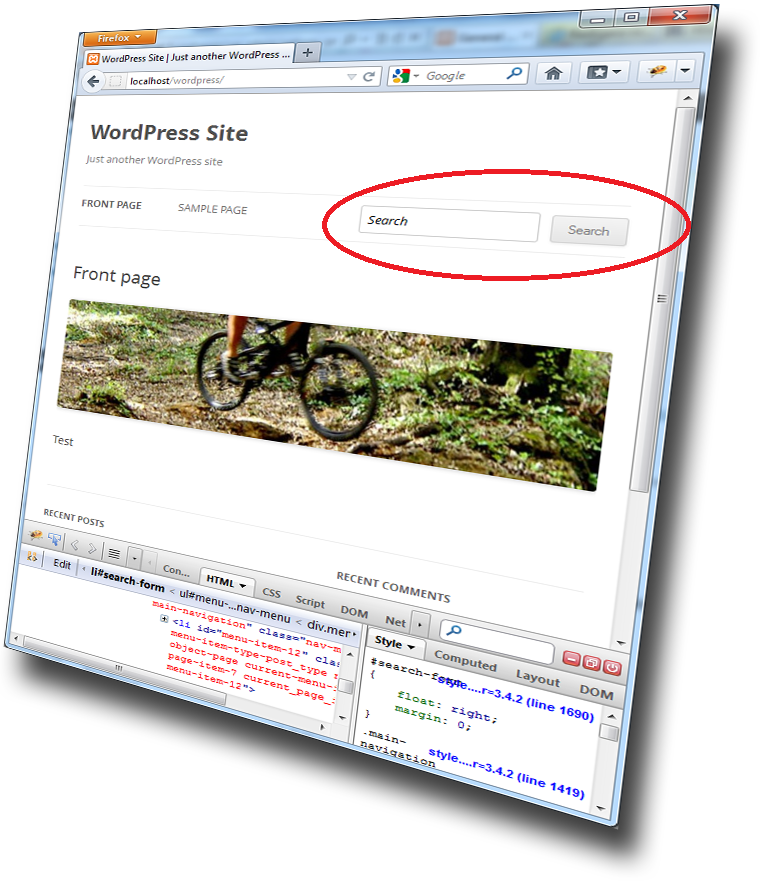
I am working on a new WordPress site using the TwentyTwelve responsive theme. I wanted the search form to render on the same level as the primary navigation main menu. This is the code I was using to solve this. This code is valid for most WordPress themes.
Put this code block in your themes functions.php-file in the
\wp-content\themes\YourThemeFolder\
add_filter('wp_nav_menu_items', 'add_search_form', 10, 2);
function add_search_form($items, $args) {
if( $args->theme_location == 'primary' )
$search_text = "Search";
$items .= '<li id="search-form"><form method="get" id="searchform" action="'.home_url().'/">';
$items .= '<input type="text" value="'.$search_text.'" name="s" id="search-input" onblur="if (this.value == '') {this.value = ''.$search_text.'';}" onfocus="if (this.value == ''.$search_text.'') {this.value = '';}" />';
$items .= '<input type="submit" id="searchsubmit" value="Search" />';
$items .= '</form></li>';
return $items;
}
If you do not like the Search-button, just replace this line
$items .= '<input type="submit" id="searchsubmit" value="Search" />';
with this
$items .= '<input type="hidden" id="searchsubmit" />';
Add this styles in your themes style.css-file in the
\wp-content\themes\YourThemeFolder\
#search-form { float:right; margin:0; }
#search-input {
	margin:6px 0;
	width: 150px;
	font-style: italic;
}
The result should be something like the image above!
By the way, have a look at the excellent new Twenty Twelve theme with responsive design created by the WordPress team!
Download the new WordPress 2012 Twenty Twelve Theme

Relaterade poster
 Uppgradera din robotgräsklippare med titanbelagda knivar. Här finns också prisvärda skarvklämmor om begränsningskabeln gått av. Och instrument för att hitta var kabeln gått av, högkvalitativ begränsningskabel som går att köpa per meter och som passar samtliga robotgräsklippare samt andra tillbehör och reservdelar till robotgräsklippare.
Enkel betalning via

Swish nummer: 123 640 82 07


RRS feed